Hash Indexes
Concept. A hash index maps a key to its page via a hash function, supporting O(1) equality lookups (WHERE id = 42) but no range scans (WHERE id BETWEEN 10 AND 100).
Intuition. When you query "find Mickey's user record" (WHERE user_id = 1), a hash index returns the page in one IO. But for "find users with user_id between 100 and 200," the hash gives no help, because neighbouring keys land on random pages.
Prerequisites. Index Fundamentals introduces what (key, page#) pairs are and how pointers work.
How a Hash Index Finds a Row
A hash index stores the same (value, page#) pairs any index does, but the bucket for each pair is chosen by a hash function. The caption below traces two lookups: a clean unique-key case (Alice) and a duplicate-key fan-out case (Dan).
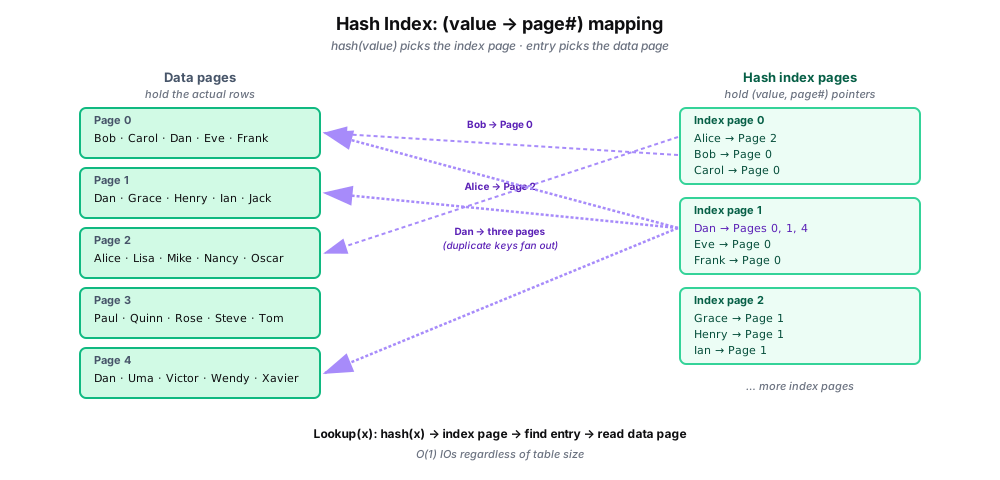
When a key has duplicates (Dan in the diagram), the index entry lists every page they live on, and the database reads each one in turn. That fan-out is the only cost that scales with anything other than the table size.
Two Ways to Organize a Hash Index
Basic: one giant dictionary
index = {
  "Alice": 2,
  "Bob":   0,
  "Carol": 0,
  "Dan":   [0, 1, 4],
  # ... a billion more entries
}

page_num = index["Alice"]   # O(1)
Simple, and works fine until the dictionary stops fitting in RAM. One billion entries at 16 bytes each is 16 GB, at which point every lookup starts with a disk read.
Partitioned: split across N pages (default)
# split into N=16 smaller indexes
index_pages = [ {...}, {...}, ... ]   # 16 pages

def lookup(key):
    which = hash(key) % 16      # pick the page
    return index_pages[which][key]
Each index page is about 64 MB and fits comfortably. The extra hash step is free, and the semantics are unchanged.
What Hash Indexes Are Good At, and What They Break On
The hash function is what makes this fast, and it's also what limits it. Hashing scatters neighbouring keys to random buckets, so any query that needs keys in order gets no help at all.
Works great
WHERE user_id = 42
WHERE order_id = 'ABC-123'
WHERE session_key = 'xyz789'
Any predicate that resolves to a single key value: equality, primary-key lookup, session ID, cache key.
Useless
WHERE age > 21
ORDER BY created_at
WHERE name LIKE 'A%'
WHERE price BETWEEN 10 AND 50
Any predicate that spans a range of keys, requires sorted order, or matches a prefix. Reach for a B+Tree instead.
Algorithm
Build and lookup
Build(table, key_column):
    B = choose_bucket_count()            // often a prime
    index = array[B] of lists

    for row in table:
        key = row[key_column]
        bucket = hash(key) % B
        index[bucket].append((key, row_pointer))

    return index

Lookup(index, search_key):                // O(1) average
    bucket = hash(search_key) % B
    for (key, pointer) in index[bucket]:
        if key == search_key:
            return pointer                 // found
    return null                            // not found
Hash choice matters. A poor hash clusters keys into a few buckets and degrades lookup to O(N), so production databases use well-studied hashes like MurmurHash and xxHash.
Key Takeaways
-
O(1) equality lookups. Three IOs regardless of table size, which is hard to beat for point queries.
-
No help for ranges or sorts. Neighbouring keys scatter to random buckets.
-
Partitioning keeps huge indexes practical. The semantics stay the same, and each partition fits in RAM.
Next
B+Tree Indexes → Keeps keys sorted, so the same index handles both point lookups and range scans.